
Game Nights
Game Nights (called Game Collections internally) let you group related games into a single session (a Friday night, a holiday tournament, a weekly gaming group) and track who wins the most games across the evening.
How It Works
Section titled “How It Works”- From the sidebar or game list menu, create a New Game Night (Game Collection)
- Give it a name (e.g., “Friday Game Night”) and set the date
- Select participants from your personas or persona groups
- Add games to the night as you play them
- The app keeps a cross-game win tally to crown an overall winner
Fixed Participant List
Section titled “Fixed Participant List”When you create a Game Night, the participant list is set at creation:
- All games in the night use the same players
- This keeps the cross-game tally consistent
- Players come from your persona library, with team personas supported too
Cross-Game Tallies
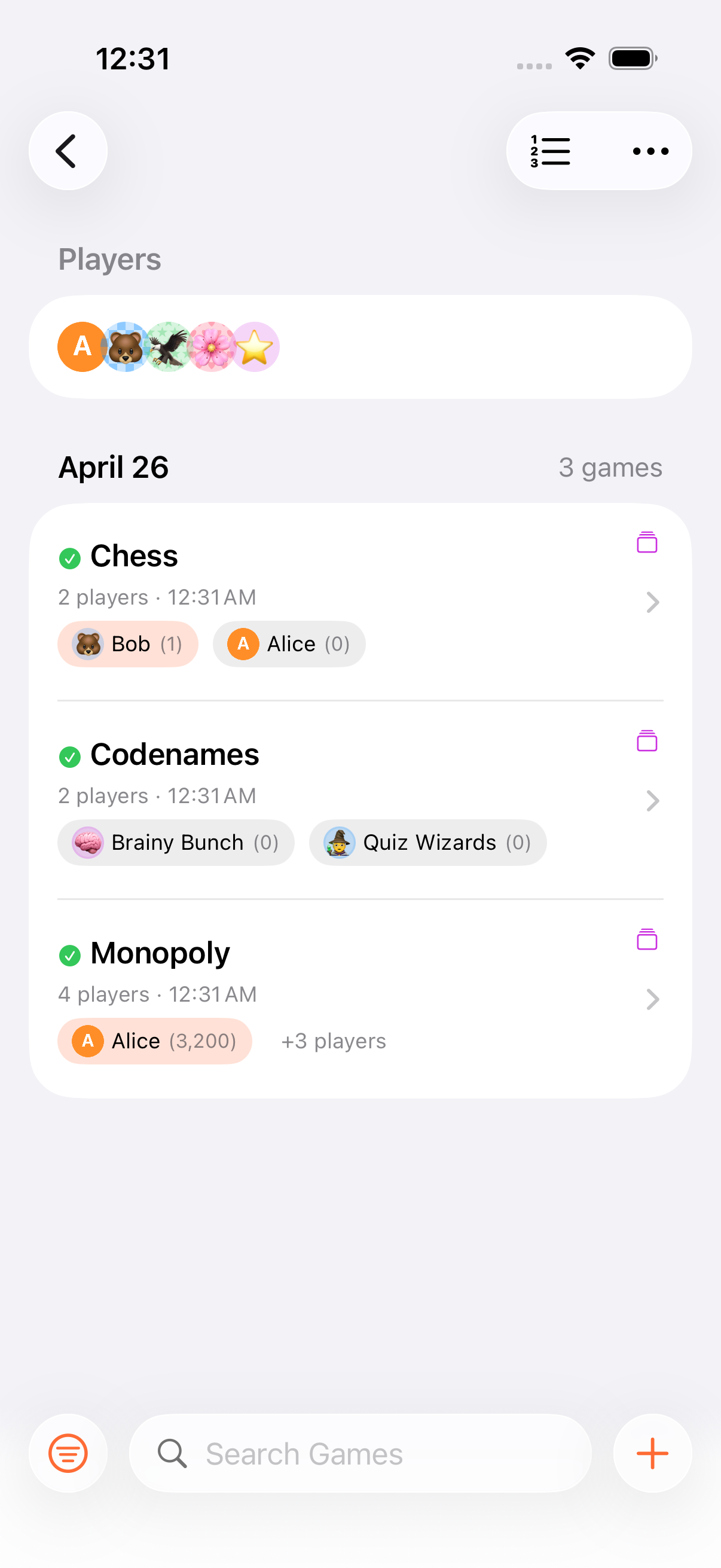
Section titled “Cross-Game Tallies”The Game Night view shows:
- Each game played, with its winner
- A running tally of wins per player
- The overall leader (most game wins)
Auto-Completion
Section titled “Auto-Completion”A Game Night automatically marks itself as completed when all of its games are finished. If you add a new game to the night or reopen a finished one, the night becomes active again.
- Create a persona group for your regular gaming crew to speed up Game Night setup
- Each game in a Game Night can have its own settings: different scoring modes, end conditions, rounds, and timers
- Use Game Nights for poker nights, family game sessions, or any multi-game event
- Want a fixture list and a table rather than a running tally? Create a Tournament instead
Related Features
Section titled “Related Features”- Personas: Create profiles for your players
- Persona Groups: Organise players for quick selection
- Finishing Games: How individual games end
- Tournaments: A collection with a generated schedule and a standings table
Can I add a game to a Game Night after creating it?
Section titled “Can I add a game to a Game Night after creating it?”Yes. You can add games to a Game Night at any time: create a new game from within the Game Night view, or pick an existing one via the collection picker.
What if not all players participate in every game?
Section titled “What if not all players participate in every game?”The participant list is fixed at the Game Night level, but individual games within the night share that roster. The cross-game tally only counts wins for players who participated in a given game.
Can I remove a game from a Game Night?
Section titled “Can I remove a game from a Game Night?”Yes. Delete the game from within the Game Night, and the tallies update accordingly. (Deletions are soft. The game goes to Recently Deleted for 30 days.)